
WooCommerce Store Automation & Product Management
WooCommerce Store Automation & Product Management
Managing an active WooCommerce store requires juggling dozens of manual tasks daily: adding new products, adjusting prices for flash sales, writing engaging product descriptions, monitoring low-stock levels, and updating inventory.
Digent Smart AI connects your conversational AI directly to your WooCommerce catalog via the wp_content engine, turning Claude and ChatGPT into your 24/7 autonomous e-commerce store manager.
[!TIP] Full Product Schema Support:
Digent natively handles all core WooCommerce postmeta fields:_regular_price,_sale_price,_stock,_stock_status,_manage_stock,_sku, andproduct_cattaxonomies.
E-Commerce Automation Pipeline
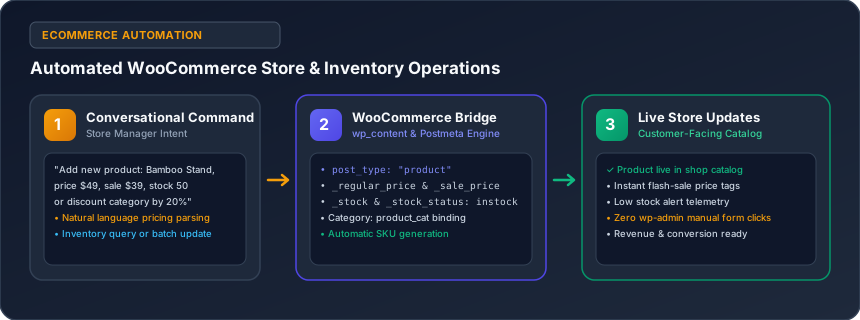
The diagram below shows how conversational instructions update your store's live catalog and inventory:
Core E-Commerce Operations
1. Adding New Products in Seconds
Instead of opening multiple wp-admin tabs to set regular prices, sale prices, inventory levels, SKUs, and categories, simply say:
"Add a new WooCommerce product: 'Ergonomic Bamboo Laptop Stand'. Regular price $49.99, sale price $39.99. Write an appealing 250-word product description highlighting its ergonomic posture benefits, add bullet points for dimensions and materials, assign it to 'Office Accessories', and set inventory to 50 units."
The AI creates the product post type, populates the description, sets metadata (_regular_price: 49.99, _sale_price: 39.99, _stock: 50), and links the product_cat taxonomy instantly.
2. Running Weekend Flash Sales & Bulk Price Updates
Running promotions shouldn't take hours of manual editing:
"Put all products in the 'Summer Apparel' category on a 20% discount for our 48-hour flash sale. Update their sale price, set the sale schedule, and draft an announcement push notification for our subscribers."
The AI iterates across products in that category, calculates the new discounted _sale_price, and saves the updates safely.
3. Inventory Audits & Low-Stock Alerts
Stay on top of store inventory without manually checking product pages:
"Inspect our WooCommerce inventory. List any products that are currently out of stock or have fewer than 10 units remaining. Summarize our top 3 best-selling items this month."
The AI queries inventory metrics and returns a concise summary table so you can reorder stock before running out.
4. Conversion-Focused Description Optimization
Stale or generic manufacturer descriptions hurt sales:
"Review the product description for 'Wireless Noise-Canceling Headphones'. Rewrite it to address common customer pain points (noisy office environments, long flights), add a technical specifications table, include a 3-question FAQ accordion, and optimize it for search engines."
Supported WooCommerce Metadata Matrix
| Field | Postmeta Key | Supported Values |
|---|---|---|
| Regular Price | _regular_price |
Numeric decimal (e.g., 49.99) |
| Sale Price | _sale_price |
Numeric decimal (e.g., 39.99) |
| Inventory Stock | _stock |
Integer (e.g., 50) |
| Stock Status | _stock_status |
instock, outofstock, onbackorder |
| Manage Stock | _manage_stock |
yes / no |
| Product SKU | _sku |
Unique alphanumeric identifier |
| Categories | product_cat |
Comma-separated category names or slugs |
Related Guides in E-Commerce, SEO & Marketing Automation
Have questions or need technical support?
Our engineering team is ready to help you connect your AI agents.