
No-Code Website & Landing Page Design via AI
No-Code Website & Landing Page Design via AI
You no longer need to spend hours dragging-and-dropping blocks, configuring responsive grid CSS, or wrestling with complex visual builders. With Digent Smart AI, you can describe the exact website page or marketing funnel you want in natural language, and your AI assistant will scaffold native WordPress Gutenberg blocks, set responsive multi-column layouts, configure page templates, and publish or draft the page instantly.
[!TIP] 100% Native WordPress Blocks:
All pages created by Digent Smart AI use native WordPress core blocks (core/group,core/columns,core/heading,core/buttons,core/image). There are zero proprietary shortcodes or vendor lock-in, ensuring lightning-fast load times and seamless theme compatibility.
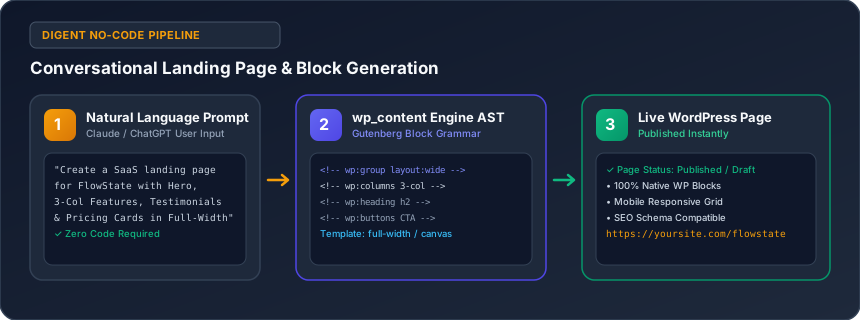
Architectural Workflow
The diagram below illustrates how conversational prompts are transformed into structured Gutenberg blocks and published live to your website:
Core Capabilities of the wp_content Engine
When you ask Claude or ChatGPT to design a page, the request is processed by Digent's high-efficiency wp_content engine:
- Semantic Gutenberg Block Generation: Creates structured HTML comments (
<!-- wp:group -->,<!-- wp:columns -->,<!-- wp:heading -->,<!-- wp:buttons -->) adhering strictly to the WordPress Block Grammar specification. - Dynamic Page Template Resolution: Automatically assigns layout templates such as
full-width,blank, orelementor_canvasvia postmeta (_wp_page_template). - One-Step Front Page Activation: When requested, the engine automatically sets the newly generated page as the site's official Main Homepage (
set_as_front_page: true) by updating WordPress core optionsshow_on_frontandpage_on_front. - Custom CSS Styling Overrides: Injects tailored CSS styles via
wp_filesfor subtle hover animations, glassmorphism headers, or custom accent gradients, backed up by automated snapshot rollbacks.
Supported Page Templates
Digent Smart AI supports all standard WordPress core templates as well as popular visual builder canvases:
| Template Slug | Best Used For | Header & Footer |
|---|---|---|
full-width |
Modern SaaS landing pages, marketing showcases | Included (Theme default) |
blank |
Standalone lead capture pages, webinar registrations | Stripped (Clean canvas) |
elementor_canvas |
Custom Elementor funnels, zero distraction landing pages | Stripped (Elementor blank slate) |
elementor_header_footer |
Full-width builder pages retaining main site navigation | Included (Theme / Builder header) |
default |
Standard blog layouts, knowledge base articles | Included with theme sidebar |
Real-World Conversational Prompt Recipes
Copy and paste these real-world prompts directly into Claude or ChatGPT to build complete, conversion-focused pages:
Recipe 1: High-Converting B2B SaaS Landing Page
"Design a modern, conversion-focused landing page for my productivity app 'FlowState'. Include:
1. A bold hero section with a headline, value proposition paragraph, and two CTA buttons ('Start Free Trial' and 'Watch Demo').
2. A 3-column feature grid with icons highlighting 'Instant Sync', 'Smart Automation', and 'Bank-Grade Security'.
3. A social proof section with 2 customer testimonials in clean quote callouts.
4. A 3-tier pricing matrix (Starter $19/mo, Pro $49/mo, Enterprise Custom).
5. An FAQ accordion using Gutenberg blocks.
Set the template to 'full-width' and save it as a draft with the slug 'flowstate-app'."
Recipe 2: Creative Agency Portfolio & Hero Showcase
"Create a premium 'About Our Creative Studio' page. Include our design philosophy, a 4-column metrics grid ('150+ Projects Launched', '12 Industry Awards', '99.4% Client Satisfaction', '8 Years in Business'), team leadership bios with photo placeholders, and a contact consultation form block. Publish it with the slug 'about-us'."
Recipe 3: Setting a New Homepage with Automatic Activation
"Design a fresh 2026 homepage for our boutique digital consulting firm. Format it with clean full-width hero image blocks, modern typography, customer brand logos, and immediately set it as the website's Main Front Page."
Custom Styling & Micro-Animations
You can ask your AI assistant to inject polished micro-interactions and CSS enhancements:
- "Make our main header sticky with a blurred glassmorphic background effect when users scroll down."
- "Give all primary button blocks a warm amber gradient from
#f59e0bto#d97706with a subtle hover lift." - "Add 16px rounded corners and soft box shadows to all card containers on the
/servicespage."
All CSS tweaks are saved into your child theme or custom stylesheet with automated timestamped backup snapshots in wp-content/digent-smart-ai-backups/, allowing 1-click rollbacks at any time.
Best Practices & Tips
- Review in Draft Mode First: Ask your AI assistant to create pages with
status: "draft"so you can preview the layout in the WordPress editor before publishing to the public. - Inspect Block Grammar: All generated pages are 100% editable in the standard Gutenberg block editor—you can freely modify text, swap images, or rearrange sections at any time.
- Mobile Responsiveness: Digent automatically configures responsive column break rules (
is-stacked-on-mobile) so layouts look impeccable across smartphones, tablets, and desktops.
Related Guides in No-Code Website & Content Creation
Have questions or need technical support?
Our engineering team is ready to help you connect your AI agents.