
Elementor, Divi & Page Builder Workflows
Elementor, Divi & Page Builder Workflows
Visual page builders like Elementor, Divi, Beaver Builder, and Bricks power millions of WordPress websites. While visual drag-and-drop editors are intuitive for manual design adjustments, scaffolding complex 8-section landing pages from scratch can take hours of tedious clicking.
Digent Smart AI acts as an intelligent bridge between conversational AI and visual builders. You can instruct your AI assistant to scaffold complete page structures, set dedicated canvas templates, and inject custom CSS overrides safely—without disrupting existing visual builder designs.
[!NOTE] Zero Plugin Conflicts:
Digent Smart AI does not replace your page builder; it complements it. The AI prepares the semantic architecture, sets canvas templates, and configures postmeta so your design team can open the page directly in Elementor or Divi and start styling immediately.
Visual Builder Integration Architecture
The following diagram illustrates how Digent coordinates page templates, structure scaffolding, and CSS overrides for visual builders:
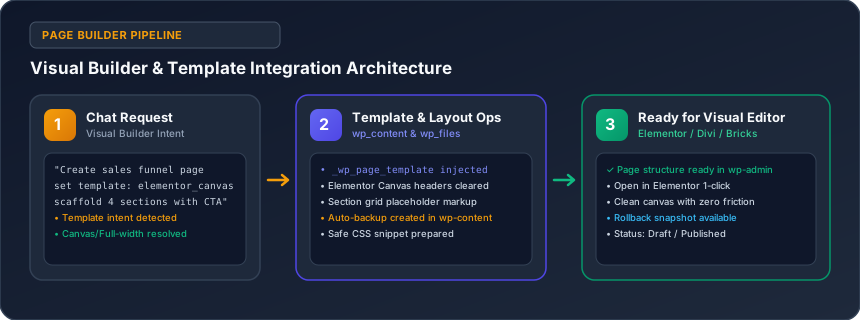
1. Setting Page Templates via Chat
When building sales funnels, webinar landing pages, or product launches, default theme elements (like archive sidebars or standard navigation bars) can distract visitors and reduce conversions.
You can programmatically set visual builder templates via chat prompts:
"Create a new landing page titled 'Spring Masterclass 2026' and set its template to elementor_canvas."
Supported Page Builder Templates in wp_content
| Template Option | Supported Builders | Resulting Page Layout |
|---|---|---|
elementor_canvas |
Elementor / Elementor Pro | Completely blank canvas: theme header, footer, and sidebars removed. |
elementor_header_footer |
Elementor / Elementor Pro | Full-width container retaining your Elementor theme builder header and footer. |
et_builder_template |
Divi / Extra Theme | Native Divi full-width blank page layout. |
full-width |
Astra, GeneratePress, Kadence | Native theme full-width container without sidebar widgets. |
2. Scaffolding Layouts for Designer Handoff
Instead of building wireframes from scratch, ask your AI assistant to generate the entire section structure:
"Create a draft landing page titled 'Executive Leadership Retreat'. Structure it with 5 sections: Hero with headline and CTA, 3-column benefits grid, speaker itinerary table, pricing tier cards, and a FAQ section. Set the template to 'elementor_canvas' so our design team can style it in Elementor."
Your AI client will generate the entire page with proper semantic containers, placeholder headings, and clean container IDs, saving your team hours of setup time.
3. Safe CSS Overrides with Automatic Snapshots
Page builders sometimes make fine-tuned responsive CSS tweaks challenging. Through the wp_files engine, your AI can inject precise CSS overrides:
"Add a custom CSS rule targeting Elementor accordions on mobile devices: ensure title fonts are 15px, expand padding to 18px, and add an amber border on active tabs."
Why It's 100% Safe:
- Automated Timestamped Snapshots: Before any file is modified, a snapshot is saved to:
wp-content/digent-smart-ai-backups/YYYY-MM-DD_HH-II-SS_style.css - Instant Reversion: If an edit produces unexpected styling, say:
"Revert the last modification to my style.css from the backup snapshot."
The engine restores the original file within milliseconds.
Troubleshooting & Cache Clearing
After applying template or CSS changes via AI, visual builders often cache static assets. If changes do not reflect immediately:
- Clear Page Builder Cache: Ask your AI:
"Run a flush on the Elementor CSS cache and clear WordPress object transients."
The AI invokescli_transient_cleanto flush cached CSS files. - Hard Refresh Browser: Press
Ctrl + F5(Windows) orCmd + Shift + R(Mac) to bypass local browser caches.
Related Guides in No-Code Website & Content Creation
Have questions or need technical support?
Our engineering team is ready to help you connect your AI agents.