
Effortless Content Publishing & Block Formatting
Effortless Content Publishing & Block Formatting
Traditional content publishing workflows are broken. Content creators often write drafts in Google Docs or Notion, manually copy-paste text into WordPress, reformat broken headings, re-insert quote callouts, manually assign categories and tags, and fix image alignments.
Digent Smart AI eliminates this friction entirely. You can draft, format, categorize, schedule, and publish rich editorial articles directly from your conversational AI assistant.
[!TIP] Direct Google Docs & Notion Ingestion:
Simply paste your raw research notes, bullet points, or interview transcripts into Claude or ChatGPT. The AI structures the material into semantic Gutenberg blocks and publishes directly to your WordPress site.
Content Operations Pipeline
The following diagram illustrates how raw ideas and notes are converted into structured, SEO-ready articles:
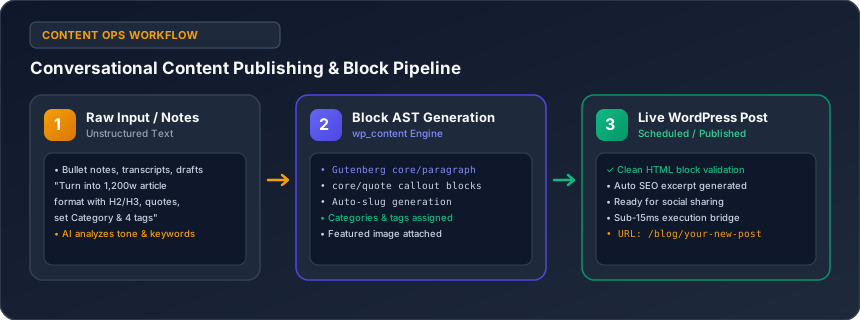
Semantic Gutenberg Block Formatting
Digent Smart AI formats articles using native WordPress block grammar, guaranteeing responsive, high-converting editorial layouts:
- H2 & H3 Hierarchy: Clear, structured semantic headings that improve readability and search engine indexing.
- Quote Callouts (
core/quote): Eye-catching blockquotes with italicized text and author attribution for key quotes. - Takeaway Callout Boxes: Custom styled warning or tip containers (
core/groupwith custom background colors) highlighting critical takeaways. - Comparison & Feature Tables (
core/table): Structured HTML tables with styled headers and borders. - Bullet & Numbered Lists (
core/list): Clean, readable lists for step-by-step instructions or feature breakdowns.
Real-World Publishing Recipes
Recipe 1: Convert Raw Research into a Polished Blog Post
Paste your raw notes into Claude or ChatGPT and say:
"Transform these raw research notes into a polished 1,500-word article titled 'The Future of Renewable Energy in 2026'. Format it with:
• Engaging H2 and H3 headings.
• Two key takeaway callout boxes.
• A comparison table evaluating Solar vs. Wind vs. Geothermal efficiency.
• Assign to the 'Clean Energy' category and add tags 'solar', 'wind', 'sustainability'.
Save it as a draft with a generated SEO excerpt."
Recipe 2: Bulk Taxonomy & Tag Management
Keep your WordPress taxonomy clean without manual clicks:
- "Create 4 new categories for our technology blog: 'Artificial Intelligence', 'Cloud Infrastructure', 'Cybersecurity', and 'Web Development'."
- "Audit all posts currently filed under 'Uncategorized'. Suggest proper categories based on their titles and content, and reassign them."
Recipe 3: Social Media Snippets & Excerpts
- "Review our 5 most recent articles and generate an engaging, 2-sentence excerpt for each so they display attractive preview cards when shared on LinkedIn, X, and Facebook."
Recipe 4: Updating & Refreshing Stale Content
Search engines favor fresh, up-to-date content:
"Find our post titled 'Top WordPress SEO Plugins 2025'. Update the title to 'Top WordPress SEO Plugins 2026', refresh the introductory section to discuss AI-driven search engines, verify that the recommendations remain accurate, and update the publish date to today."
Editorial Workflow Summary
| Task | Traditional Manual Workflow | With Digent Smart AI |
|---|---|---|
| Formatting Blocks | 20–45 mins manual clicking | Instant via natural language prompt |
| Setting Taxonomies | Manual dropdown selection | Automatic auto-tagging & categorization |
| SEO Excerpts | Copy-pasting text into snippet fields | AI generates high-CTR teaser automatically |
| Content Refresh | Manual search, edit, update, re-date | 1 conversational command updates live post |
Related Guides in No-Code Website & Content Creation
Have questions or need technical support?
Our engineering team is ready to help you connect your AI agents.