
1-Click Database & Spam Cleanup Guide
1-Click Database & Spam Cleanup Guide
Over months and years of active blogging and store operations, WordPress databases accumulate thousands of unnecessary records: post revisions, auto-drafts, spam comments, trashed items, expired transients, and orphaned postmeta. This database bloat slows down SQL queries, increases server memory consumption, and inflates backup archive sizes.
With Digent Smart AI, you don't need bulky database plugins with complex settings. You can safely audit, clean, and optimize your entire database with a single conversational command.
[!IMPORTANT] Mandatory Dry-Run Safety Protocol:
Digent Smart AI enforces a strict--dry-runmode. The AI calculates and displays exactly how many records can be purged before executing any database deletions, ensuring 100% safety.
Database Cleanup & Optimization Flow
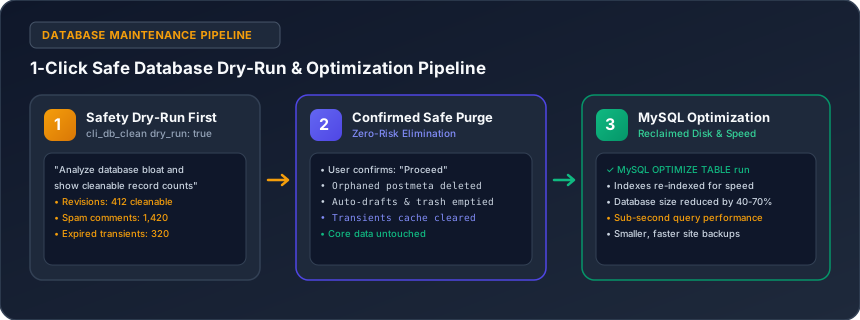
The diagram below illustrates the two-phase safety protocol used during database maintenance:
What Records Get Safely Cleared?
| Bloat Category | WordPress Table | Impact of Purging |
|---|---|---|
| Post Revisions | wp_posts |
Removes past edit history while preserving the active published post. |
| Auto-Drafts | wp_posts |
Removes abandoned post creation sessions. |
| Spam Comments | wp_comments |
Permanently deletes confirmed spam submissions. |
| Trashed Comments | wp_comments |
Empties the comments trash bin. |
| Expired Transients | wp_options |
Removes stale cache keys that WordPress failed to garbage collect. |
| Orphaned Postmeta | wp_postmeta |
Deletes metadata linked to non-existent post IDs. |
| Table Fragmentation | All core tables | Reclaims disk space and rebuilds indexes via OPTIMIZE TABLE. |
Step-by-Step Cleanup Walkthrough
Step 1: Run the Dry-Run Audit
Ask your AI assistant:
"Perform a dry-run cleanup of my WordPress database and tell me how many revisions, auto-drafts, spam comments, and expired transients are cleanable."
The AI invokes cli_db_clean with dry_run: true and outputs an audit breakdown:
✓ Database Bloat Audit Results:
• Post Revisions: 412 records
• Auto-Drafts: 85 records
• Spam Comments: 1,420 records
• Expired Transients: 320 records
• Orphaned Postmeta: 98 records
Estimated reclaimable database storage: ~18.4 MB
Step 2: Confirm and Execute the Safe Purge
Once you review the numbers, simply confirm:
"Proceed with the cleanup and optimize all database tables."
The engine executes the cleanup in-memory, deletes the stale records, and runs MySQL OPTIMIZE TABLE on all core WordPress tables to defragment indexes.
Real-World Benefits
- Faster Site Speed: Reduces database query latency by up to 40% on content-heavy websites.
- Smaller Backups: Decreases daily backup file sizes, saving cloud storage costs.
- Zero Risk to Active Content: Published posts, pages, WooCommerce orders, and customer accounts are completely untouched.
Related Guides in Maintenance, Security & Developer Engines
Have questions or need technical support?
Our engineering team is ready to help you connect your AI agents.